Match demand and lead time
Enter average units sold per day and supplier lead time in days. Use the time from placing the order until stock is available to sell, including relevant transit and receiving time.
 THE BUSINESS WORKBENCH Review my inventory and fulfilment workflow
Plan replenishment before a shortage
Compare your inventory position with a simple replenishment threshold. Use average daily demand, supplier lead time and your chosen safety stock to spot when the next buying decision needs attention.
Start the calculatorFree to use. Results after contact details.
IS THIS THE RIGHT TOOL?
For sellers and inventory teams monitoring replenishment for a product with a known supply lead time.
YOUR BUSINESS DECISION
Start with your own figures or use the example inputs. Complete the steps, then share contact details to reveal your free result.
Loading your tool…
MAKE THE INPUTS USEFUL
Enter average units sold per day and supplier lead time in days. Use the time from placing the order until stock is available to sell, including relevant transit and receiving time.
Enter the extra units you want to hold beyond expected lead-time demand. This is your chosen allowance; the calculator does not derive it from demand variability or a service-level target.
Enter stock on hand after deducting committed or backordered units, plus confirmed incoming stock. Review arrival dates separately: the tool adds incoming units without checking when they become available.
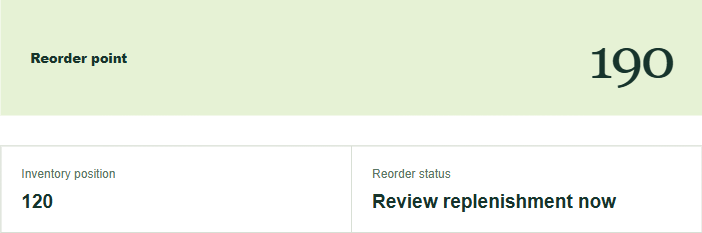
The reorder point is the whole-unit threshold based on demand during lead time plus safety stock. Inventory position combines the stock and incoming units you entered. At or below the threshold, the result prompts a replenishment review. It does not calculate an order quantity or guarantee stock will last until the next delivery.
COMMON QUESTIONS
Choose a period that resembles the demand you expect next. A promotion, long stockout or seasonal peak can distort a simple average, so keep those events in mind.
Use the time from placing the order until stock is available to sell. Depending on your process, that may include production, transport, clearance and receiving.
No. Reorder point is the rounded-up demand during supplier lead time plus the Safety stock you enter. The tool compares that trigger with Stock on hand plus Confirmed incoming stock; deduct committed or backordered units from your stock input first. It does not calculate a purchase quantity. Set that separately using your buying cycle, supplier MOQ, cash and storage.
Use the lead time your operation actually experiences, including delays before stock becomes sellable, and review the Safety stock input. The tool uses steady average demand and your chosen buffer; it does not estimate delivery variability or automatically choose safety stock.
FROM PLANNING TO ACTION